Little features make a big difference
I was using iTunes just now, and I wanted to locate the audio file for a podcast on my computer. So I right-clicked its row and selected “Get Info.” That brings up a window which has the path of the song, but this field is not left-click selectable. (I use iTunes 7.1.1.5.) I was afraid I might have to resort to typing the path in the Windows “Run” box, but fortunately I tried right-clicking the area. To my surprise, this context menu appeared, and it was as if it had read my mind!
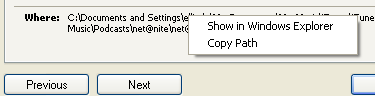
I was expecting that maybe I could copy the path, and then I’d open up the folder myself. Not so! The menu not only has “Copy Path”, which is what I thought I wanted, but it also has “Show in Windows Explorer”, which is what I really wanted to do. Good job, Apple.
iTunes is great. I’ve always used Show in WExplorer, but I’ve never seen Copy Path.
I just wish, they would make the interface all iTunes, and no windows xp.
(I’ve seen those windows blue bars on info screens, and it bothers me.)
You can also select Show Song File or something like that when you right click in the list view of your library or albums.
Thanks, Tom!
Can anyone say how much Windows 7 cost?